My Dotfiles
My Linux desktop configuration, primarily for Arch Linux and CachyOS: Hyprland, Zsh, Neovim, Alacritty, and tmux, with Waybar and Mako.
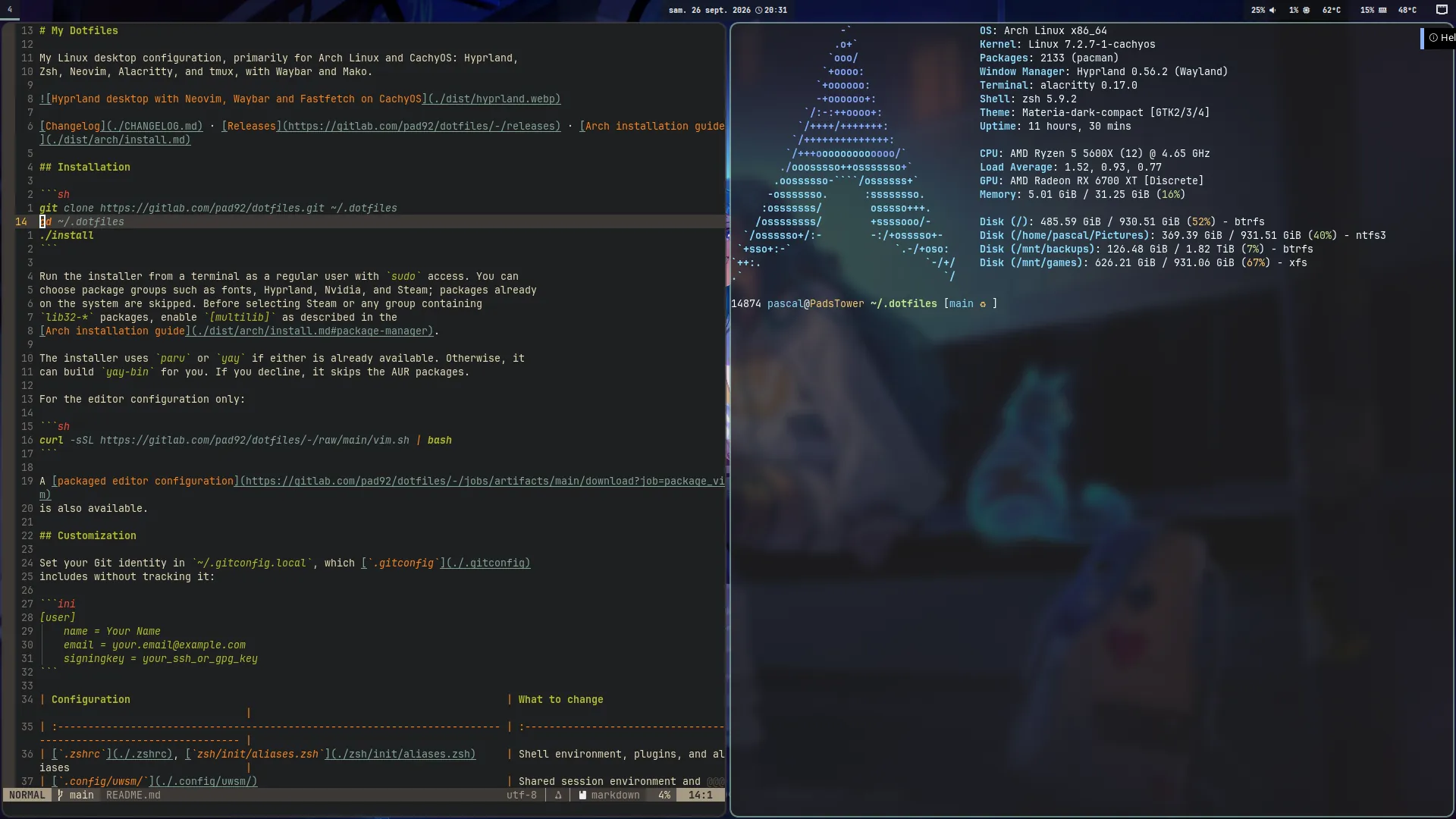
Changelog · Releases · Arch installation guide
Installation
git clone https://gitlab.com/pad92/dotfiles.git ~/.dotfiles
cd ~/.dotfiles
./install
Run the installer from a terminal as a regular user with sudo access. You can choose package groups such as fonts, Hyprland, generation-specific GPU drivers, containers, infrastructure tools, and Steam; packages already on the system are skipped. Select only the hardware and alternative-tool groups that match the machine. Before selecting Steam or any group containing lib32-* packages, enable [multilib] as described in the Arch installation guide.
The installer preselects the base, GTK, and Hyprland groups. It also detects PCI graphics controllers and preselects the matching AMD, Intel, or NVIDIA driver group. Hybrid Intel/NVIDIA systems get both GPU groups. Legacy Intel GPUs (older than Broadwell) and legacy NVIDIA GPUs (Maxwell, Pascal, and Volta) are distinguished from newer hardware. These are menu defaults, so they can still be changed before confirmation. Canon and Samsung printer drivers are separate from the generic printer stack, as are Docker and Podman and the OpenTofu and Terraform IaC tools.
The installer uses paru or yay if either is already available. Otherwise, it can build yay-bin for you. If you decline, it skips the AUR packages.
Package installation is additive by default. Use ./install --package-plan to preview changes without requesting sudo access, or ./install --reconcile-packages to review packages previously installed by the dotfiles installer that are no longer selected. Reconciliation never claims packages that predated its state file and requires explicit confirmation before removal. Previous group selections are restored from state, then detected GPU groups replace saved GPU defaults so the menu follows the current hardware. The base, GTK, and Hyprland defaults are then enabled on every run; an empty selection after manually clearing the menu still means “skip”.
When at least one GPU group is selected, the installer also finds installed packages belonging only to unselected GPU profiles. It asks pacman to remove them after the desired drivers are installed and only if the previewed removal transaction contains no desired or protected package. --package-plan reports these removals without applying them.
For the editor configuration only:
curl -sSL https://gitlab.com/pad92/dotfiles/-/raw/main/vim.sh | bash
A packaged editor configuration is also available.
Customization
Set your Git identity in ~/.gitconfig.local, which .gitconfig includes without tracking it:
[user]
    name = Your Name
    email = your.email@example.com
    signingkey = your_ssh_or_gpg_key
| Configuration | What to change |
|---|---|
.zshenv, .zprofile, .zshrc | Shell environment, desktop login, plugins, and aliases |
.config/uwsm/ | Shared session environment and compositor-specific GPU settings |
.config/hypr/ | Bindings, window rules, and hosts/<hostname>.lua hardware layouts |
hyprtoolkit.conf | Toolkit colors, fonts, GTK/icon themes, and geometry |
.config/waybar/ | Status bar, including per-host configurations |
.config/alacritty/, .tmux.conf | Terminal appearance and tmux bindings |
.config/nvim/, .vimrc | Editor settings and plugins |
.config/awww/ | Local and remote wallpaper sources |
~/.local/share/backgrounds/ | Local images for wallpaper rotation |
Shell settings include LANG, EDITOR, and the Oh My Zsh plugin list. The common UWSM environment defines BROWSER, TERMINAL, and XCURSOR_THEME, while env-hyprland contains host-specific GPU settings such as AQ_DRM_DEVICES and Vulkan drivers. Hyprland host files define monitor layouts and workspace mappings; Waybar uses config.PadsTower and config.PadsP5560 for different hardware.
Alacritty settings cover fonts, spacing, opacity, and colors. For Hyprland Lua validation and completion, see .config/hypr/.luarc.json. Electron 38 and later select native Wayland automatically in a Wayland session, without an environment variable; ~/.config/electron-flags.conf remains available for editor-specific flags.
Shell and editors
Zsh uses Oh My Zsh with docker, ansible, git, vscode, and thefuck, plus autosuggestions and syntax highlighting. It also configures history, prompt themes, and $HOME/.bin in PATH.
Custom aliases and functions
Aliases live in zsh/init/aliases.zsh, and shell functions load from zsh/functions/.
| Alias | Command |
|---|---|
terraform | tofu, when available |
mediasync | Home media server sync script |
backup | ~/.dotfiles/bin/backup.sh |
steam-opt | steam-optimize |
mirrored, mirrors, mirrora | mirror sorted by delay, score, or age |
Common functions:
| Command | Purpose |
|---|---|
arch_update | Run yay -Syu --devel, firmware checks, Flatpak updates, and orphan/cache cleanup |
clean_arch | Remove orphan packages, clean pacman/yay caches, and find .pacnew / .pacsave files |
mirror [delay\|score\|age] | Select and rank French Arch mirrors with reflector |
extract <file> | Unpack archives including .tar.bz2, .tgz, .zip, .rar, and .7z |
gpg-encrypt <file/dir> / gpge | Encrypt files or directories recursively; prompt for the GPG email |
gpg-decrypt <file/dir> / gpgd | Decrypt files or directories and extract .tar.gz.gpg / .tgz.gpg archives |
md5, sha1, sha256, sha512 <string> | Hash a string with OpenSSL |
ssh-copy-agent-keys [user@host] | Select keys from ssh-agent and add them to remote authorized_keys without duplicates |
ip_a, ip_l, ip_p | Show all, local, or public IP information |
curl_time <url> | Measure DNS, connection, first-byte, and total HTTP timings |
meteo | Show the weather through wttr.in |
transfer <file> | Upload to transfer.sh and return a shareable URL |
youtubeEncode <file> | Encode video with libx264 and AAC for YouTube |
radio | Listen to radio from the terminal |
calc "<expr>" | Evaluate expressions with bc |
src | Reload the shell configuration |
Maintenance functions live in arch.zsh; archive and encryption helpers live in archive.zsh and crypt.zsh. The GPG helpers preserve modification times and offer to delete source files. Encryption uses --trust-model always; decryption also restores timestamps when extracting archives.
Shell shortcuts
Configured in zsh/init/key-bindings.zsh:
| Shortcut | Action |
|---|---|
Ctrl+R | Search backward through history |
Ctrl+X Ctrl+E | Edit the command in $EDITOR |
Ctrl+Left/Right | Move by word |
Alt+L (Esc L) | Run ls |
Alt+W (Esc W) | Cut text between the cursor and mark |
Alt+M | Copy the previous shell word |
Up/Down after typing | Search history by the typed prefix |
PageUp/PageDown | Navigate history |
Home/End | Move to the start/end of the line |
Shift+Tab | Cycle completion backward |
Space | Expand history references |
Follow several logs
mtail prefixes lines with the filename and uses tail -F to follow files across rotation. It prints the last 10 lines and scans for new matches every second. Quote globs to include future files:
mtail                              # Defaults to *.log
mtail app.log worker.log           # Specific files
mtail '*.log' '/var/log/app/*.log'  # Current and future matches
mtail 'my app.log'                 # Spaces in filenames
Ctrl+C stops the followers without closing Zsh. Requires awk and standard command-line tools, not inotify-tools.
Editors
Neovim is configured in Lua:
lazy.nvimmanages plugins and lazy loading.- Telescope searches files, buffers, and symbols.
nvim-treesitteron itsmainbranch provides highlighting, indentation, and folding. This setup requires Neovim 0.12+.- Native LSP (
vim.lsp.config/vim.lsp.enable, available since 0.11) works with Mason andnvim-cmp.LspAttachsets navigation, diagnostic, and formatting shortcuts. - Gitsigns shows changes in the margin and provides hunk navigation, staging, and blame commands.
- Gruvbox, Lualine, and vertical indentation guides define the appearance.
The older Vim setup uses Vundle, a custom status line, filetype settings, vim-gitgutter, and vim-fugitive. Alacritty is the terminal; tmux includes session-management and layout-persistence plugins.
Desktop
The Hyprland configuration uses Lua and requires Hyprland 0.55+. The theme starts in hyprtoolkit.conf. include/toolkit.lua parses it, config.lua consumes it, and conf/autostart.lua applies GTK/libadwaita settings through gsettings. Lock-screen colors remain separate, as described below.
For TTY startup, see the session installation guide. It covers GNOME Keyring PAM configuration in /etc/pam.d/login, UWSM setup, Zsh startup files, and systemd session services. The upstream systemd guide provides further context.
Main shortcuts
| Shortcut | Action |
|---|---|
SUPER + Return | Terminal |
SUPER + E / C / W / M | File manager / editor / browser / music player |
SUPER + Shift + Return | Password manager |
SUPER + Shift + Q | Close window |
SUPER + [0-9] / SUPER + Shift + [0-9] | Focus workspace / move window to workspace |
SUPER + Arrows or Vim keys | Move focus; add Shift to move the window |
SUPER + F / SUPER + ALT + Space | Toggle fullscreen / floating |
SUPER + L / SUPER + Delete | Lock / logout menu |
SUPER + ALT + Right | Change wallpaper |
SUPER + PgUp/PgDn / SUPER + Home | Zoom in/out / reset |
Print / SUPER + P | Screenshot |
Media and brightness keys control volume, playback, and screen brightness. Left-click Waybar's audio module to switch to the next output sink. Right-click it to open pavucontrol.
Wallpapers and lock screen
awww.sh selects a different image for each monitor from local files or an existing NFS/CIFS mount. Photos keep their aspect ratio, use a blurred copy as background, and show their date and city when the metadata is available. Rendered images account for each monitor's scale factor on mixed-DPI setups. In auto mode, an unavailable, empty, or slow remote source falls back to local images.
Copy the sample to create the Git-ignored configuration. The script reloads it each time it runs and uses the sample itself when the local file is absent.
cp ~/.config/awww/awww.conf-sample ~/.config/awww/awww.conf
The sample documents multiple local and remote source directories, NFS/CIFS mounts, timeouts, and troubleshooting commands.
Put fallback images in ~/.local/share/backgrounds/. For example, this command copies images tagged paysage from another directory:
exiftool -q -if '$Keywords =~ /paysage/' -r ${SRC_DIR} \
    -o "${XDG_DATA_HOME:-$HOME/.local/share}/backgrounds/"
awww.service starts with Hyprland, and awww_random.timer changes wallpapers every 30 minutes. Apply changes with:
systemctl --user restart awww_random.service
Hyprlock shows the time, system batteries, and current media. Player text and artwork refresh every 3 seconds; battery status refreshes every 10 seconds.
For media playing in Firefox or Chrome, the source label reads xesam:url and shows the service name instead of the browser. Known services such as Deezer and YouTube get their own icon. Other valid domains use a globe, while missing or invalid URLs fall back to the browser name.
The helper scripts read metadata with playerctl, download HTTPS covers with curl, and resize them to 150 × 150 with ImageMagick. Downloads and conversions have size, time, and resource limits. Covers are cached by URL under $XDG_RUNTIME_DIR, or in a private ${TMPDIR:-/tmp} directory when no runtime directory is available. A cached cover stays on screen if refreshing that same URL fails or Firefox deletes its temporary image. When there is no usable cover for the current URL, Hyprlock displays a transparent image.
Battery readings come from /sys/class/power_supply and exclude peripherals. Colors and positions are configured in hyprlock.conf.
Scripts
See bin/ for the full collection.
| Script | Purpose |
|---|---|
steam-optimize (steam-opt) | Python 3 game launcher with monitor detection, RADV/Vulkan ICD/Mesa layer settings, per-game overrides, Gamescope, and session cleanup |
backup.sh (backup) | Back up with rsync and SSH agent authentication, report Arch orphans without removing them; exclude patterns |
awww.sh | Select a wallpaper per monitor from local files or an available NFS/CIFS mount |
razer_dpi.py | Manage Razer mouse DPI |
hypr-screenshot.sh | Capture the desktop showcase in a nested compositor with make screenshot |
comcut, comskip.sh | Detect and remove commercial breaks with comskip/ffmpeg, adapted from comchap |
diff-cmd | Compare a command's output for two arguments using the IN placeholder |
vscodium_ext.sh | Install VSCodium extensions |
CI and releases
The repository is mirrored on GitHub, GitLab, and a self-hosted Gitea instance. All three use shared scripts in .ci_bin/.
| Forge | Pipeline | Documentation |
|---|---|---|
| GitHub | .github/workflows/ | Workflows README |
| GitLab | .gitlab-ci.yml | GitLab CI README |
| Gitea | Reuses .github/workflows/ | See the Workflows README |
.ci_bin/build_pages.sh builds the README, changelog, installation guide, and CI documentation into a static site. It also backs the local post-commit preview hook. The CI pages are published at /github/workflows/README.md/ and /.gitlab/README.md/; the GitHub path loses its leading dot because actions/upload-pages-artifact strips .github from the published archive.
Tags matching v* publish a release using the matching changelog section, extracted by .ci_bin/extract_release_notes.sh.
Application ecosystem
| Category | Tools |
|---|---|
| Shell | Zsh |
| Editors | Neovim, Vim, VSCode |
| Terminal and sessions | Alacritty, tmux |
| Desktop tools | Waybar, hyprlauncher, Mako |
| Passwords | Proton Pass CLI |
| System information | Fastfetch, Htop |
Maintained by pad🐐 with ❤️ since 2015 (11+ years)